Passwords
How passwords get stolen, what makes one strong, and why you want a password manager.
- Document
- SEC-01
- Rev
- A
- Status
- Stable
- Published
- Length
- 905 words
- Topic
- cybersec
- Content
- 6db5307
Passwords are like keys to your digital home. If every door opens with the same key, and that key is easy to copy, you’re in trouble.
The most common mistakes:
- one password for several services;
- simple passwords that are “easy to remember”[1], or passwords built from your name, birthday or username;
- passwords kept in an unencrypted file.
How passwords get stolen
Data breaches
Services get breached, and the stolen passwords are tried, together with the email addresses, on other sites. That’s how the password to a forum you forgot about years ago can open your email, and your email can open everything else. So every service needs its own password, not the same one with the site’s name added on.
Phishing
An email about your “account being suspended” can lead to a fake sign-in page, and no password is long enough to protect you there. A password manager helps you notice the fake: it won’t offer your password on someone else’s domain. If autofill unexpectedly does nothing, check the address. Open important services from bookmarks, not from links in messages.
Guessing
Attackers don’t try every combination of characters. They try common
passwords, dictionaries and earlier leaks, along with substitutions like
@ for a and a birth year at the end. Once they have stolen password
hashes, they test guesses on their own hardware with no limit on attempts.
Only length and randomness help against that.
Malware
Malware can record keystrokes, steal browser data, or take over a session that’s already signed in. A password manager won’t protect you from this: keep your system updated and be careful with programs and browser extensions.
Strong passwords
Random passwords
Generate a separate random password for each service, at least 15
characters long, and longer if the service allows. For example:
Vq9!sL7@pT2#xN8zR4$k. Capitals, digits and symbols alone don’t make a
password strong: Password123! is still a bad one.
If a service strictly limits password length (some banking apps do), use a random password of the maximum allowed length: per character, it gives more strength than a passphrase.
Passphrases
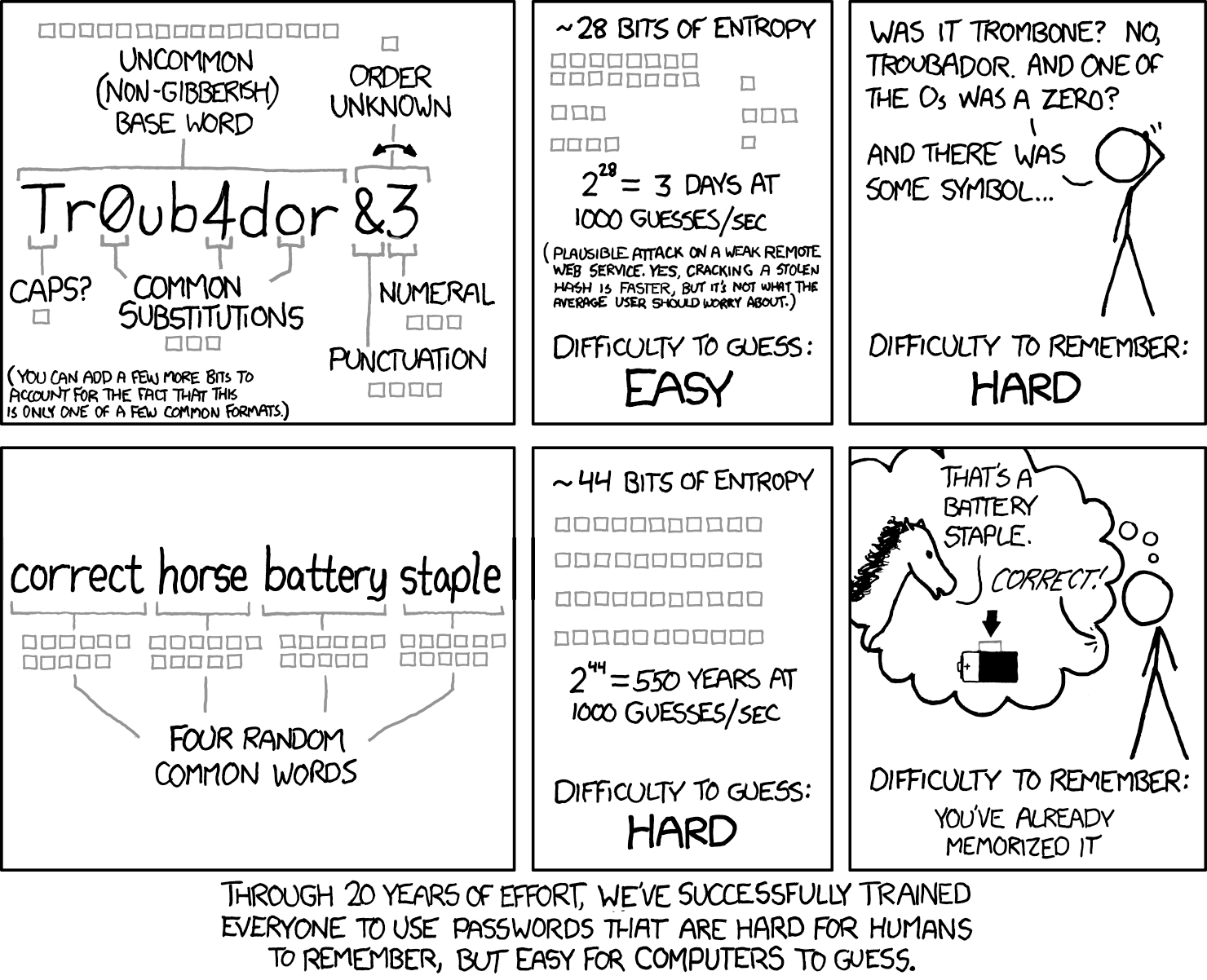
Passphrases are easier to remember and to type by hand, but they need more characters than a random password of the same strength.
The reliable way is to generate six or more random words in your password
manager, for example:
turmeric-kindling-polyester-taps-parasitic-orbit.
To remember the words, tie them to images in your head, without changing
the phrase itself.
A random digit or symbol in a random place in the phrase makes it much harder to guess.
If you make up a phrase yourself, avoid quotes, song lyrics, common sayings and facts about yourself: they’re easy to add to a cracking dictionary. Length alone doesn’t make a phrase safe.
Password managers
A password manager stores your sign-in details and generates strong passwords. With one, you don’t have to remember dozens of passwords, only a single master password.
The master password
Memorise the master password and don’t use it anywhere else. A long passphrase works well[2].
While you’re learning it, you can write it on paper and keep it somewhere safe. Don’t photograph that paper, and don’t keep the password in your phone’s notes.
Which manager to choose
Check that the manager works on all your devices, how to move your data in and out, and how to recover access.
Cloud managers sync between devices:
- 1Password: the best paid option;
- Proton Pass: a good option if you already use other Proton services;
- Bitwarden: a good free option for personal use.
Managers with a local vault, whose file you sync yourself, are the KeePass family:
- KeePassXC: Windows, macOS, Linux;
- KeePassDX: Android;
- KeePassium: iOS, macOS.
Do this today
You don’t have to change every password in one evening:
- Install a manager, create a master password, and check that the vault opens on the devices you need.
- Replace your main email password with a generated one: it can reset the passwords of your other accounts.
- Then your financial services, your Apple, Google or Microsoft account, and your work accounts.
- Update the rest gradually, as you sign in to each service.
Importing old passwords doesn’t make them safer: reused and weak ones still need replacing. A strong, unique password, on the other hand, doesn’t need changing on a schedule unless there are signs it was stolen.
Next: two-factor authentication and a plan for recovering access.
Further reading
- How to Choose a Password, Computerphile
- Password Cracking, Computerphile
- The Best Password Managers to Protect Your Privacy, Privacy Guides